Microsft Defender for Endpoints
Make sure "Turn Off Microsoft Defender" Policy is not activated (its a GPO). It should be set to NOT configured or Disabled
Phases de deploiements:
Étape 1 : Configurer Microsoft Defender pour point de terminaison déploiement : cette étape se concentre sur la préparation de votre environnement pour le déploiement.: - Vérifier l’état de la licence - Emplacement du centre de données - Configuration réseau
Étape 2 : Attribuer des rôles et des autorisations : identifiez et attribuez des rôles et des autorisations pour afficher et gérer Defender pour point de terminaison.
Étape 3 - Configurer les fonctionnalités : Vous êtes maintenant prêt à configurer les fonctionnalités de sécurité de Defender pour point de terminaison pour protéger vos appareils.
Étape 4 : Identifier votre architecture et choisir votre méthode de déploiement : identifiez votre architecture et la méthode de déploiement qui convient le mieux à votre organization.
Étape 5 - Intégrer des appareils : évaluez et intégrez vos appareils à Defender pour point de terminaison: - Évaluation: identifiez 50 appareils à intégrer au service à des fins de test. - Pilote: intégrez les 50 à 100 points de terminaison suivants dans un environnement de production. - Exécuter une simulation: https://learn.microsoft.com/fr-fr/microsoft-365/security/defender-endpoint/attack-simulations?view=o365-worldwide#run-a-simulation - Déploiement complet: déployer le service dans le reste de l’environnement par incréments plus importants
Pre-requists
Run the client analyzer on Windows
Direct connection Proxy: - Unauthenticated - No TLS inspection
crl.microsoft.com ctldl.microsoft.com crl.microsoft.com www.microsoft.com/pkiops/ www.microsoft.com/pki/ uk-v20.events.data.microsoft.com or *.events.data.microsoft.com
Add Microsoft Defender for Endpoint to the exclusion list for your existing solution
C:\Program Files\Windows Defender Advanced Threat Protection\MsSense.exe
C:\Program Files\Windows Defender Advanced Threat Protection\SenseCncProxy.exe
C:\Program Files\Windows Defender Advanced Threat Protection\SenseSampleUploader.exe
C:\Program Files\Windows Defender Advanced Threat Protection\SenseIR.exe
C:\Program Files\Windows Defender Advanced Threat Protection\SenseCM.exe
C:\Program Files\Windows Defender Advanced Threat Protection\SenseNdr.exe
C:\Program Files\Windows Defender Advanced Threat Protection\SenseSC.exe
C:\Program Files\Windows Defender Advanced Threat Protection\Classification\SenseCE.exe
C:\ProgramData\Microsoft\Windows Defender Advanced Threat Protection\DataCollection
C:\Program Files\Windows Defender Advanced Threat Protection\SenseTVM.exe
C:\ProgramData\Microsoft\Windows Defender Advanced Threat Protection\Platform\*\MsSense.exe
C:\ProgramData\Microsoft\Windows Defender Advanced Threat Protection\Platform\*\SenseCnCProxy.exe
C:\ProgramData\Microsoft\Windows Defender Advanced Threat Protection\Platform\*\SenseIR.exe
C:\ProgramData\Microsoft\Windows Defender Advanced Threat Protection\Platform\*\SenseCE.exe
C:\ProgramData\Microsoft\Windows Defender Advanced Threat Protection\Platform\*\SenseSampleUploader.exe
C:\ProgramData\Microsoft\Windows Defender Advanced Threat Protection\Platform\*\SenseCM.exe
C:\ProgramData\Microsoft\Windows Defender Advanced Threat Protection\DataCollection
C:\ProgramData\Microsoft\Windows Defender Advanced Threat Protection\Platform\*\SenseTVM.exe
Check if the device has already been onboarded
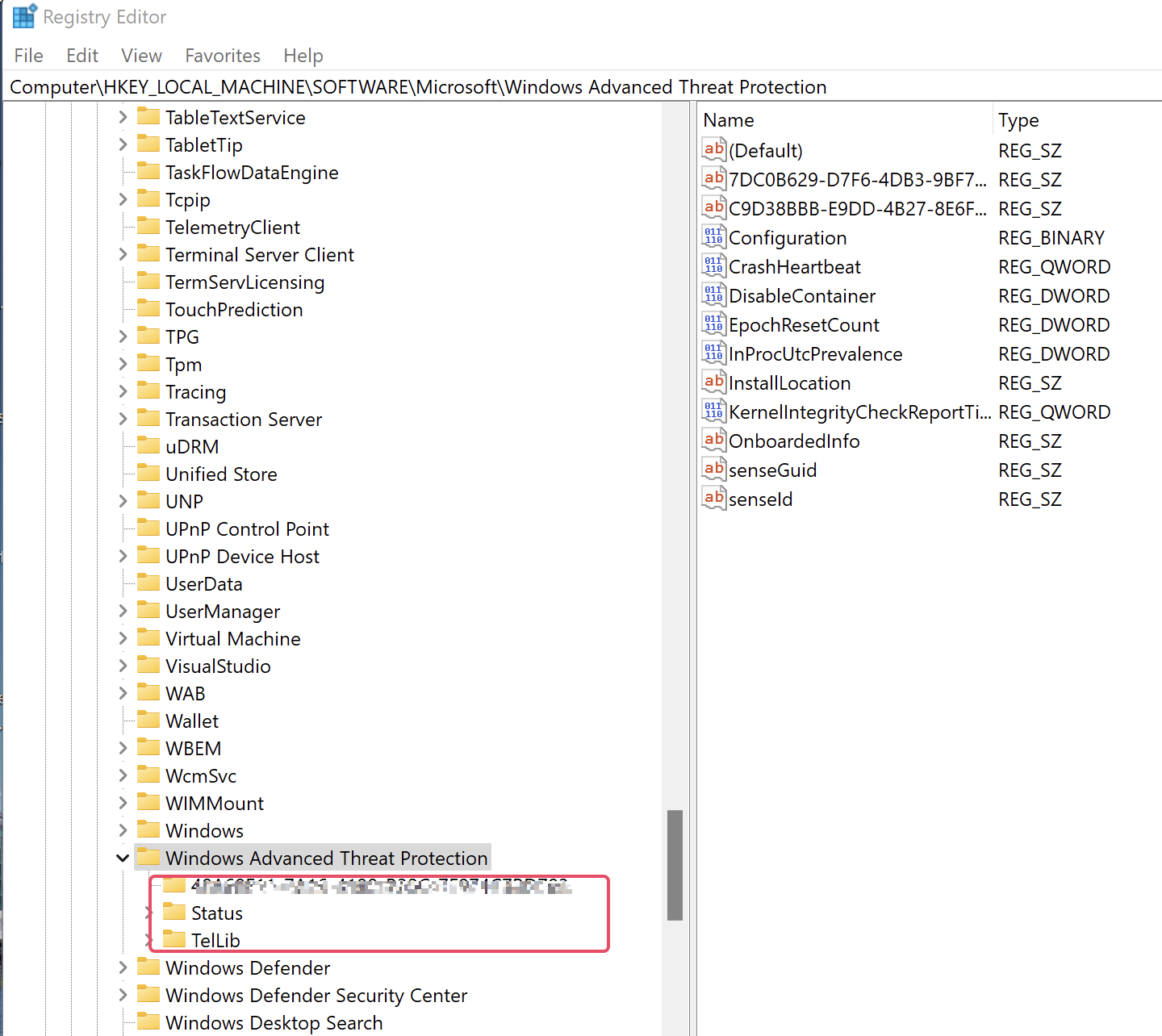
Check if "Computer\HKEY_LOCAL_MACHINE\SOFTWARE\Microsoft\Windows Advanced Threat Protection" has subfolders
Install the Windows Defender for Endpoint msi
with GPO.
under Delegation > Advanced > - Remove Authenticated users group - Add the group contenning the servers wanted > and give XXX group READ and APPLY GROUP POLICY permission
For Windows server 2012 and 2016
-
Download MDE installation packet (md4ws.msi) and onboarding script from Microsoft Security portal MDE installation packet
-
Run helper script to onboard
Pour le script onboarding il faut prendre la version pour les GPO car elle n'est pas interactive
Disable MS Defender service
La désactivation de Windows Defender 2021 peut être effectuée en utilisant l’invite de commande (CMD). sc config WinDefend start=disabled
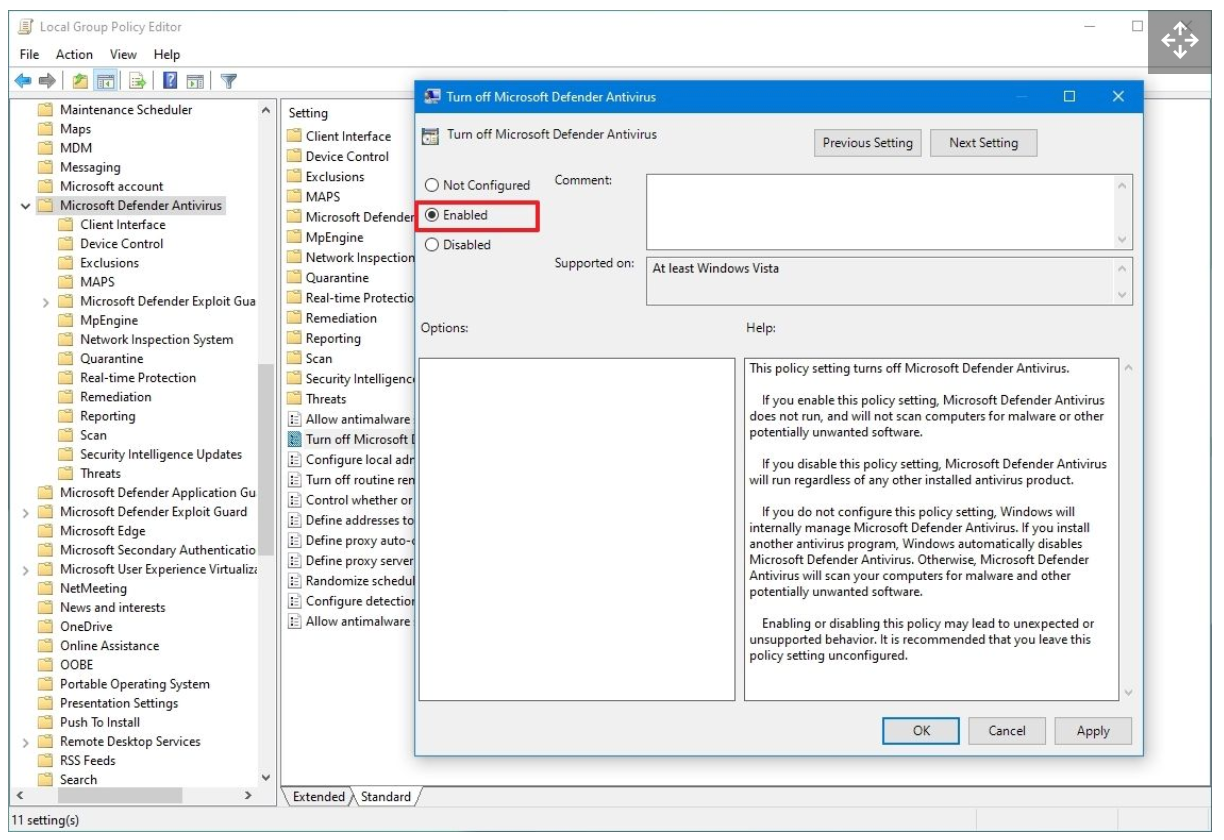
Disable MS Defender par GPO
Browse the following path: Computer Configuration > Administrative Templates > Windows Components > Microsoft Defender Antivirus
Double-click the "Turn off Microsoft Defender Antivirus" policy.
Add MDE tags on devices through GPO
Registry key : Computer\HKEY_LOCAL_MACHINE\SOFTWARE\Policies\Microsoft\Windows Advanced Threat Protection\DeviceTagging Registry key value (REG_SZ) : Group Registry key data : Servers
Get Exclusions
function Get-Exclusions {
    $Prefs = Get-MpPreference
    $Prefs.ExclusionExtension | ForEach-Object { [PSCustomObject]@{ Item = $_; Type = "Extension" } }
    $Prefs.ExclusionProcess | ForEach-Object { [PSCustomObject]@{ Item = $_; Type = "Process" } }
    $Prefs.ExclusionPath | ForEach-Object { [PSCustomObject]@{ Item = $_; Type = "Path" } }
    $Prefs.ExclusionIpAddress | ForEach-Object { [PSCustomObject]@{ Item = $_; Type = "IpAddress" } }
}

Get-Exclusions | ConvertTo-Csv -NoTypeInformation
Get ASR Status
<#
    Outputs Attack Surface Reduction rule status
#>

function Get-AttackSurfaceReductionRuleStatus {

    function Get-AsrStatus ($Value) {
        switch ($Value) {
            0 { "Disabled" }
            1 { "Enabled" }
            2 { "Audit" }
            default { "Not configured" }
        }
    }

    $Prefs = Get-MpPreference
    if ($null -eq $Prefs.AttackSurfaceReductionRules_Ids) {
        Write-Host "ASR rules not configured."
    }
    else {
        for ($i = 0; $i -le ($Prefs.AttackSurfaceReductionRules_Ids.Count - 1); $i++) {
            [PSCustomObject]@{
                RuleId = $Prefs.AttackSurfaceReductionRules_Ids[$i]
                Status = Get-AsrStatus -Value $Prefs.AttackSurfaceReductionRules_Actions[$i]
            }
        }
    }
}
Check if Defender EDR is activated
On servers SENSE must be started
When the SENSE service starts for the first time, it writes onboarding status to the registry location
HKLM\SOFTWARE\Microsoft\Windows Advanced Threat Protection\Status
SENSE service onboarding status isn't set to 1
Verify client connectivity to Microsoft Defender for Endpoint service URLs
https://learn.microsoft.com/en-us/microsoft-365/security/defender-endpoint/configure-proxy-internet?view=o365-worldwide#verify-client-connectivity-to-microsoft-defender-for-endpoint-service-urls
MDE commands
Set-MpPreference -DisableRealtimeMonitoring $false
Set-MpPreference -DisableIOAVProtection $false
New-Item -Path "HKLM:\SOFTWARE\Policies\Microsoft\Windows Defender" -Name "Real-Time Protection" -Force
New-ItemProperty -Path "HKLM:\SOFTWARE\Policies\Microsoft\Windows Defender\Real-Time Protection" -Name "DisableBehaviorMonitoring" -Value 0 -PropertyType DWORD -Force
New-ItemProperty -Path "HKLM:\SOFTWARE\Policies\Microsoft\Windows Defender\Real-Time Protection" -Name "DisableOnAccessProtection" -Value 0 -PropertyType DWORD -Force
New-ItemProperty -Path "HKLM:\SOFTWARE\Policies\Microsoft\Windows Defender\Real-Time Protection" -Name "DisableScanOnRealtimeEnable" -Value 0 -PropertyType DWORD -Force
New-ItemProperty -Path "HKLM:\SOFTWARE\Policies\Microsoft\Windows Defender" -Name "DisableAntiSpyware" -Value 0 -PropertyType DWORD -Force
start-service WinDefend
start-service WdNisSvc

New-Item -Path "HKLM:\SOFTWARE\Policies\Microsoft\Windows Defender" -Name "DisableAntiSpyware" -Force -Value 1 -PropertyType DWORD -Force
New-ItemProperty -Path "HKLM:\SOFTWARE\Policies\Microsoft\Windows Defender\DisableAntiSpyware" -Name "DisableBehaviorMonitoring" -Value 0 -PropertyType DWORD -Force

Remove-ItemProperty -Path "HKLM:\SOFTWARE\Policies\Microsoft\Windows Defender" -Name "DisableAntiSpyware" -Force
get-mpcomputerstatus
get-mpthreat
get-mpthreatdetection
Set-MpPreference -DisableRealtimeMonitoring $true
Add-MpPreference -ExclusionPath "c:\ADAMDEMO"
Update-mpsignature
Start-mpscan
Get-MpComputerStatus | Select-Object -Property Antivirusenabled,AMServiceEnabled,AntispywareEnabled,BehaviorMonitorEnabled,IoavProtectionEnabled,NISEnabled,OnAccessProtectionEnabled,RealTimeProtectionEnabled,IsTamperProtected,AntivirusSignatureLastUpdated
Arreter les Scan MDE Defender
- Passer le serveur en mode TroubleShoot
- Désactiver le Tamper Protection
- Arreter les scans