Tips & Tricks
GPOs
View Applied Policies with the Command Prompt
Use GPResult Command to Check Group Policy: Step-by-step Guide (comparitech.com)Windows Licences Activation
example:
cmd cscript c:\windows\system32\slmgr.vbs /ipk XXXXX-XXXXX-XXXXX-XXXXX-XXXXX
Dism /online /Set-Edition:ServerStandard /ProductKey:XXXXX-XXXXX-XXXXX-XXXXX-XXXXX /AcceptEula
Microsoft Change Product Key Of Office 2016/2013
=> look for a file called OSPP.VBS
cscript “C:\Program Files\Microsoft Office\Office15\OSPP.VBS”/inpkey:XXXXX-XXXXX-XXXXX-XXXXX-XXXXX
Upgrade Windows server 2022 from Evaluation to Standard
DISM /online /Set-Edition:<target edition> /ProductKey:<product key> /AcceptEula
Shortcut to Run Computer management
Windows System UI Languages
To See System Default and Installed Language of Windows 10 in Registry Editor
In Registry Editor, browse to the key location below.
HKEY_LOCAL_MACHINE\SYSTEM\CurrentControlSet\Control\Nls\Language
nslookup myip.opendns.com resolver1.opendns.com
Change user password in Windows 10
cmd.exe in administrative mode [Windows-Logo+X].
And now enter the new Windows 10 password and retype the password to confirm the password.How to force Windows 10 & 11 to synchronise with a clock time server?
Method 1
Press Windows key + r and type services.msc and press enter. Right click on Windows Time and select properties to check the status of the service. Restart the Windows Time service. Click on OK. Restart the computer
Method 2
Click on clock and select “Change date and time settings”. Click on the “Internet Time” tab. Check if it is set to “synchronize the time with time.windows.com” If the option is selected, click on change settings to check the option “Synchronize with an Internet Time server” Click on OK.
Method 3
Press Windows key + X and select Command prompt(Admin). Type each one of the command below and press enter.
Restart the computer to test the issue again. W32tm.exe is used to configure Windows Time service settings. It can also be used to diagnose problems with the time service. W32tm.exe is the preferred command line tool for configuring, monitoring, or troubleshooting the Windows Time service.How to increase or Change trust relationship time limit on domain controller
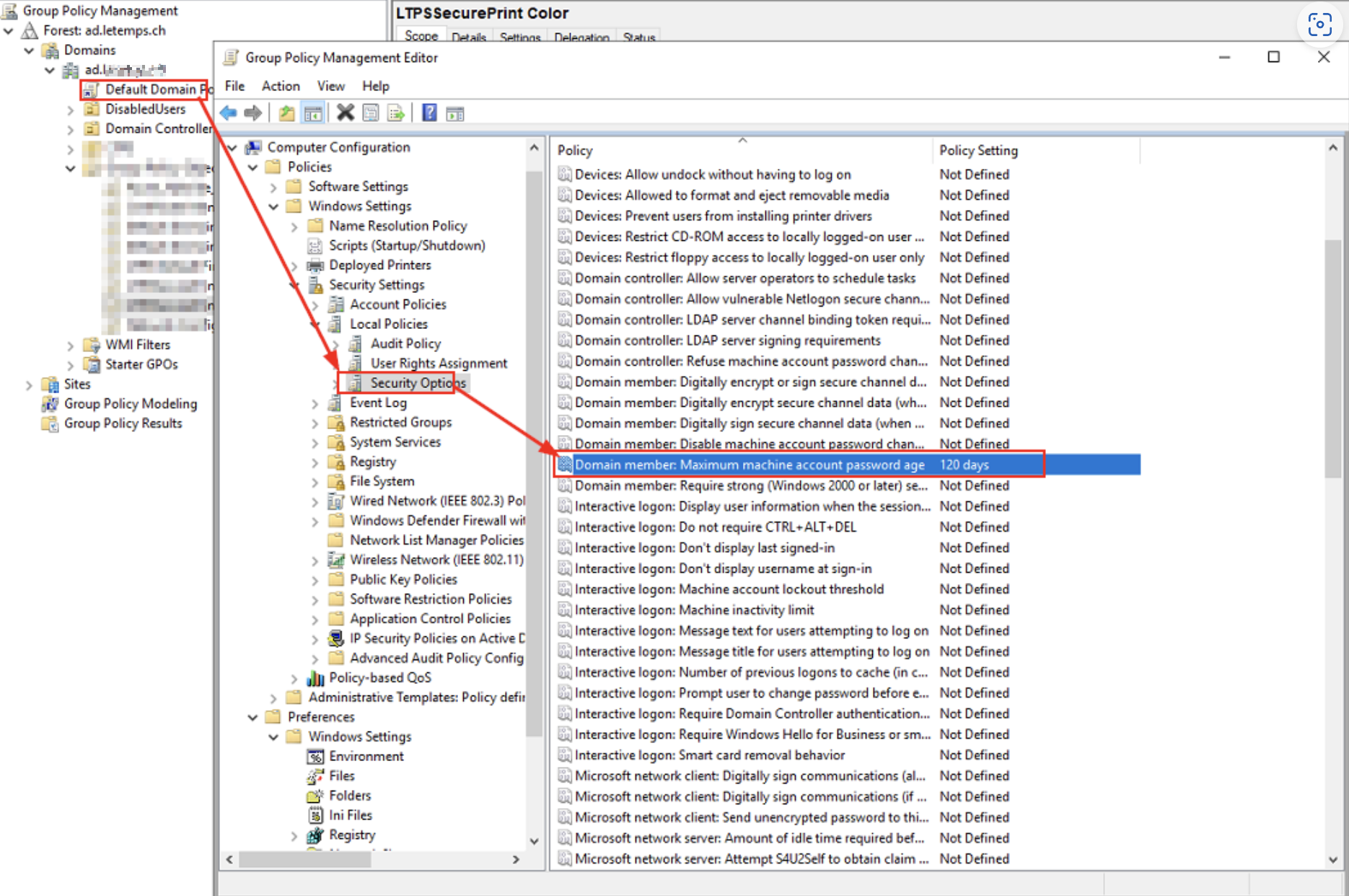
How to check if a windows registry key exists using powershell?
You can use the Test-Path cmdlet in PowerShell to check if a Windows registry key exists. The syntax is as follows:
'HKEY_LOCAL_MACHINE\Path\To\Key' with the path to the registry key you want to check. If the key exists, the cmdlet will return True; if it doesn't exist, it will return False.
Verify groups
Adding a domain admin
// Create a new user
// Add the new user to Administrator local groupHow to prevent your users from downloading and installing Office via the Office portals
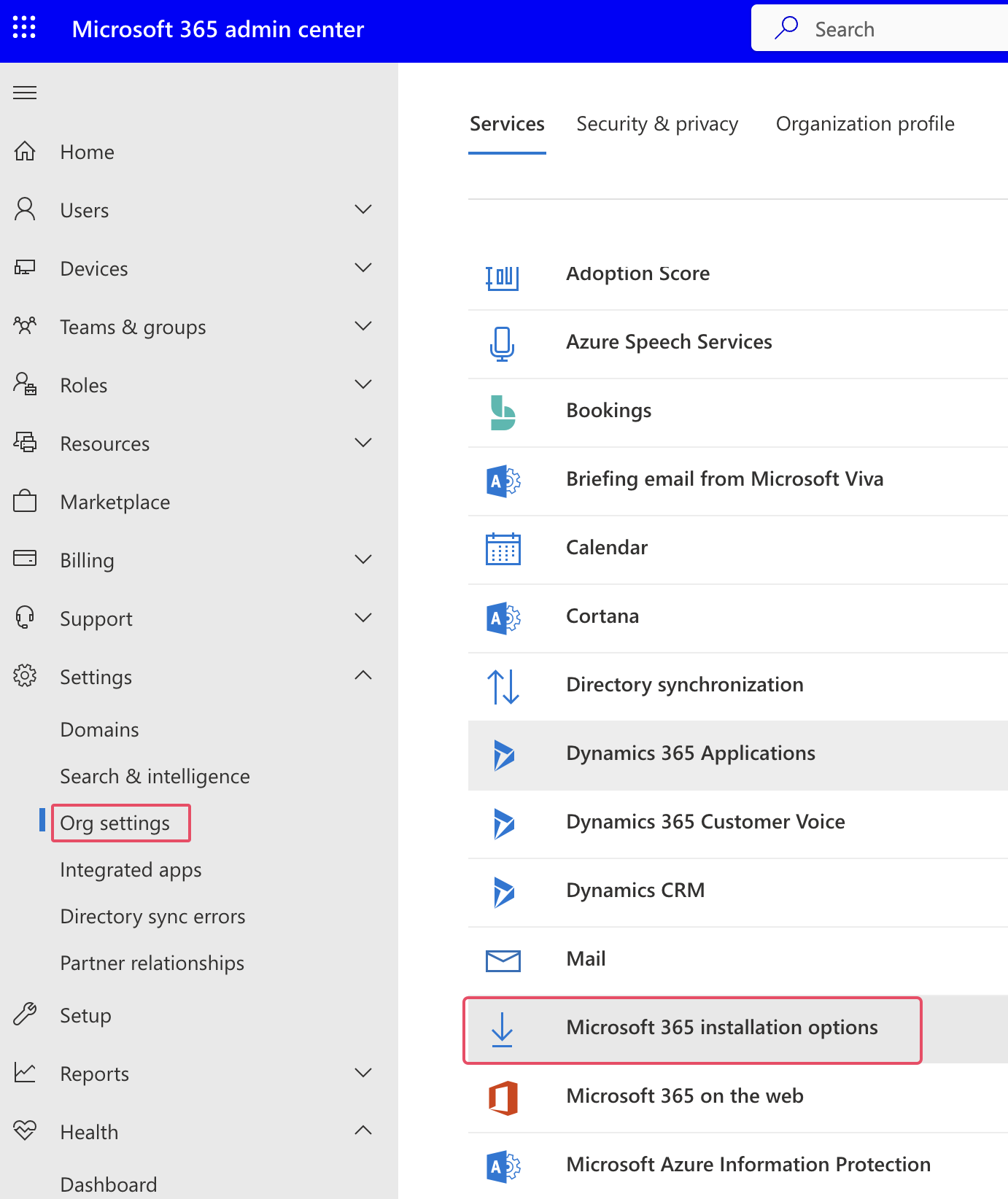
DC Server Migration
- Prepare Existing AD forest for server 2019 DC
Check FSMO roles location
Intune registration troubleshooting
https://learn.microsoft.com/en-us/samples/azure-samples/dsregtool/dsregtool/
Pour les serveurs windows 2012: https://learn.microsoft.com/en-us/microsoft-365/security/defender-endpoint/troubleshoot-security-config-mgt?view=o365-worldwide#instructions-for-applying-computer-join-rule-in-aad-connect
Windows server 2012r2 MDE enrollment status: AAD Connect misconfiguration: AAD Connect misconfiguration
+----------------------------------------------------------------------+
| Tenant Details                                                       |
+----------------------------------------------------------------------+


+----------------------------------------------------------------------+
"An error occurred while attempting to connect to server "MY-PC-NAME". Check that the Virtual Machine service is running and that you are authorized to connect to the server.
Check if the service
Restrict creation of teams
https://techlabs.blog/categories/office-365/stop-users-from-being-able-to-create-microsoft-teams
Office update installations
"C:\Program Files\Common Files\microsoft shared\ClickToRun\OfficeC2RClient.exe" /update user displaylevel=false updatetoversion=16.0.17126.20190
tasklist /FI "IMAGENAME eq OfficeC2RClient.exe"
MS Teams - Clearing Cache in Teams
New location: C:\Users\%username%\AppData\Local\Packages\MSTeams_8wekyb3d8bbwe
Classic location: %appdata%\Microsoft\Teams
Fix "Can't Extend C: Drive with Unallocated Space" in Windows 10/11
 1. disable Windows recovery environment
 2. get the recovery partition details


Copy the partion type and its attribut in a notepad and then delete the partition
cmd "
delete partition override
This will delete the recovery partition and allow you to extend the C drive

- Re-Create a recovery partition drive of 1GB and format it as NTFS with a letter


 The recovery partition is now created

- hide the partition
